Missing the Kindle Oasis and page-turn buttons? The BOOX is even better
You might not have heard of BOOX, but it's stealing many old Kindle users across to its versatile platform. With page-turn buttons too, it's a dream come true

If you want to break out of the Kindle ecosystem and explore new bookshops, a more versatile format, and get page turn buttons back, this is brilliant. It takes a little work to adjust to the Android set-up, but it’s worth it for expanding your e-reader.
-
+
Versatile functions beyond reading - organising, note-taking
-
+
Access to multiple bookstores
-
+
Page turn buttons
-
+
Fits in palm of hand
-
-
Lose access to Kindle ecosystem
-
-
Not quite as intuitive
-
-
More distractions from reading
Why you can trust Woman & Home Our expert reviewers spend hours testing and comparing products and services so you can choose the best for you. Find out more about how we test.

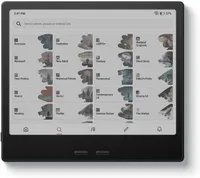
If you've been eyeing up a Kindle but wish it offered a little more freedom, the BOOX Go series is, almost certainly, exactly what you're looking for. It delivers everything most readers love about Amazon's eReaders: a crisp, paper-like display, weeks-long battery life, and distraction-free reading experience. However, you also get the bonus of more flexibility in terms of what you can download and how. Most notably, it brings back physical page-turn buttons, a feature readers (especially me) have missed ever since the Kindle Oasis disappeared from shelves.
What makes the BOOX Go stand out against the best Kindles is how effortlessly it adapts to different reading styles. Its ergonomic, palm-shaped design sits comfortably in one hand, making it ideal for reading on the sofa, commuting, or winding down in bed. The customisable front light lets you tweak both brightness and warmth to create a softer, more comfortable reading experience, whether you're enjoying a beach read in bright daylight or settling into a novel before sleep. Better still, you're not tied to a single bookstore for finding all your best reads of the month. Alongside your own EPUB library, you can download reading apps from multiple retailers, giving you access to a far wider range of books and subscriptions than a Kindle alone.
Yet the BOOX Go isn't just an eReader. You can organise books into shelves and folders, track your reading habits with detailed graphs, switch into a dedicated notes mode when inspiration strikes, and even hand it over to younger readers thanks to its built-in Kids Mode. Last year, I tried swapping my Kindle for a Kobo and this year, I've braved the BOOX. Does this prove that there's life beyond the Kindle?
BOOX Go eReader Colour Gen 2 review

- RRP: £269.99
- Screen size: 7 inches
- Display resolution: 300 dpi in Black 150 dpi in Color
- Operating system: Android
- Front light: TM (Warm and Cold) G-sensor for Auto Rotation
- Document formats: PDF, CAJ, DJVU, CBR, CBZ, EPUB, EPUB3, AZW3, MOBI, TXT, DOC, DOCX, FB2, CHM, RTF, HTML, ZIP, PRC, PPT, PPTX Image Formats: PNG, JPG, BMP, TIFF Audio Formats: WAV, MP3 Supports 3rd-party apps
- Charging port: USB-C
- Memory storage: 64 GB
Who would the BOOX Go Colour Gen 2 eReader suit?

The BOOX Go won't be the right eReader for everyone, but that's exactly what makes it so appealing. If you're perfectly happy buying all your books from Amazon and never venturing outside the Kindle ecosystem, a Kindle Paperwhite will probably do everything you need. However, if you've ever been frustrated by Amazon's limitations or wished your eReader could do a little more, the BOOX Go should absolutely have a spot on your shelf.
I think this will particularly appeal to avid readers who borrow books from different sources, buy from multiple bookshops, and have accumulated a library of EPUB files over the years. I loved not feeling tied to a single retailer. Instead, I could access my existing collection and download reading apps from various stores, giving me far more flexibility than a Kindle offers.
It's also an excellent option for anyone still mourning the loss of the Kindle Oasis. As someone who reads one-handed while curled up on the sofa, walking on a treadmill, or balancing a cup of tea in the other hand, I really appreciated having physical page-turn buttons again. It's a small feature, once adored on the Kindle Oasis, so has a bit of a cul following.
Parents will appreciate the Kids Mode, while readers who like to annotate, jot down ideas, or keep track of their reading habits will enjoy the extra productivity features. Ultimately, this is an eReader for people who love reading enough to want a device that works around their habits rather than forcing them into a particular ecosystem.
What is the BOOX Go Colour Gen 2 eReader like to use?

You can see the famous page-turn buttons along the side here
From the moment I picked up the BOOX Go, it felt noticeably different to most eReaders I've tested. The asymmetrical, palm-shaped design isn't just there for aesthetics; it makes the device easier to hold. The wider grip section sits comfortably in your hand, while the screen remains balanced, so your wrist doesn't feel strained during longer reading sessions.
That design works brilliantly alongside the physical page-turn buttons. I hadn't realised how much I missed them until I started using the BOOX Go. Whether I was reading in bed, lounging on the sofa, or squeezing in a few chapters during my commute, being able to turn pages without constantly reaching for the touchscreen made the whole experience feel more natural and immersive.

Despite offering considerably more functionality than a Kindle, the BOOX Go never felt intimidating to navigate. The bottom navigation bar keeps everything within easy reach, with dedicated sections for your library, the app store, storage, apps, and settings. Within a few minutes, I felt comfortable moving between books, downloading apps, and customising the reading experience.
Organisation is another area where the BOOX Go excels. I was able to create bookshelves and folders to keep my growing library tidy, which is particularly useful if, like me, your reading tastes jump between contemporary fiction, cookbooks, biographies, and professional reading. Instead of endlessly scrolling through a long list of titles, everything can sta neatly organised and easy to find.
Features and functions on the BOOX Go Colour Gen 2 eReader

One of the biggest advantages of the BOOX Go is that it feels far more versatile than a traditional eReader. At its core, it's still designed around reading, but there are countless ways to tailor the experience to suit your preferences.
The library section acts as the central hub for your books, whether you've purchased them through an app, downloaded them from another retailer, or transferred EPUB files directly onto the device. I particularly liked how easy it was to manage books from different sources without feeling locked into a single platform.
For readers who enjoy tracking their habits, the BOOX Go includes detailed reading statistics and graphs that show your progress over time. It's a feature that I didn't think I'd care about, but I quickly found myself checking how many hours I'd spent reading each week, celebrating my progress through longer books, and getting competitive with myself.

The front light is also impressively customisable. Beyond simple brightness controls, you can adjust the warmth of the light to create a softer, more comfortable reading experience. I often found myself dialling down the brightness and increasing the warmth before bed, creating a gentler glow that felt much kinder on tired eyes.
It’s also worth noting that this comes with a colour screen, so you don’t need to compromise on your reading. For the average paperback peruser, a colour screen just means seeing the cover in its original form. However, if you read non-fiction, cookbooks, gardening books, and any magazines, having a colour screen brings the e-reader to life. It definitely comes closer to bridging the gap between books and e-readers.
Beyond reading, the BOOX Go offers a suite of apps and tools that make it feel closer to a lightweight productivity device. Pre-installed apps include Dropbox, a dictionary, calendar, calculator, clock, recorder, browser, music player, gallery, and AI assistant. There's also access to the Google Play Store, opening up a huge range of additional reading and productivity apps.
I particularly liked the Quick Notes feature, which makes it easy to capture thoughts, shopping lists, reading notes, or ideas without reaching for another device. Combined with the Kids Mode and extensive customisation options, the BOOX Go manages to feel useful far beyond simply reading books.
Battery and display on the BOOX Go Colour Gen 2 eReader

The screen is one of the areas where the BOOX Go really shines. Text looks wonderfully crisp and sharp, with that paper-like quality that makes dedicated eReaders so much more comfortable to use than phones or tablets. Even after several hours of reading, I experienced none of the eye fatigue that often accompanies brighter LCD displays.
Colour performance is equally impressive. While it's not intended to completely compete with a tablet, illustrations, book covers, magazines, and graphic novels all look vibrant enough to add another dimension to the reading experience. The colours appear natural rather than oversaturated, which suits the e-ink display perfectly.

I also appreciated just how customisable the screen felt. The adjustable front light allows you to fine-tune both brightness and warmth, while the softer light settings create a calming atmosphere for bedtime reading. It's a small touch, but one that makes the BOOX Go feel particularly thoughtful for readers who enjoy unwinding with a book at the end of the day.
Battery life is another major strength. Throughout testing, I found myself charging the BOOX Go remarkably infrequently. Even with regular reading sessions, experimenting with apps, and using the front light, the battery seemed to drain at a reassuringly slow pace. Unlike a phone or tablet, which often requires daily charging, this is a device you can happily take away for a weekend or holiday without packing the charger.
How does the BOOX Go eReader Colour Gen 2 compare?

The BOOX Go occupies an interesting space in the eReader market because it doesn't try to beat Kindle at being a Kindle. Instead, it offers an alternative vision of what an eReader can be.
Compared with the Kindle Paperwhite, the BOOX Go provides considerably more freedom. You're not restricted to Amazon's bookshop, you can download apps through the Google Play Store, and physical page-turn buttons make one-handed reading much easier. Readers with existing EPUB libraries will also appreciate how straightforward it is to access books from multiple sources.

Where Kindle still has the advantage is simplicity. Amazon's setup process is incredibly streamlined, and if you already buy all your books through Amazon, everything works seamlessly from the moment you switch the device on. The BOOX Go asks a little more of its users initially, simply because there are more options to explore and customise.
That said, I never found the extra complexity overwhelming. In fact, once I'd spent a little time familiarising myself with the menus and settings, I preferred having the additional flexibility. The BOOX Go feels less restrictive and more adaptable, particularly for readers who don't want one company dictating where they buy their books.
Should you buy the BOOX Go Colour Gen 2 eReader?

If you're looking for the simplest possible eReader and already live comfortably within Amazon's ecosystem, a Kindle will still be the easiest choice. But if you've ever wished your eReader offered more flexibility, more customisation, and more freedom over where you get your books, the BOOX Go is a genuinely compelling alternative.
After testing it, what impressed me most wasn't any single feature but how thoughtfully everything works together. The ergonomic design makes it comfortable to hold, the page-turn buttons make reading more enjoyable, the screen is crisp and customisable, and the ability to access multiple bookstores removes many of the frustrations I've experienced with more restrictive devices.
For keen readers, former Kindle Oasis devotees, and anyone who values choice over convenience, the BOOX Go strikes a rare balance between dedicated reading device and everyday companion. It's versatile without being distracting, powerful without feeling complicated, and proof that there's life beyond Kindle.
How we test eReaders
At woman&home, we're a bunch of bookworms, which means we love testing, talking, and reading everything that we can. We started off testing Kindles when they were brand new and a real novelty. Since then, we've seen them grow into tablets, we've seen older models retire, and competitors to Amazon's own brand rise up in the ranks.
How we test each e-reader is really simple. One of our book worms (usually me), lives with the e-reader for months. In that time, it comes on commutes, long weekends, and always at least one holiday, so you get a good gauge of battery life, how it fares in an airport, and whether it's handbag friendly. From there, we can cover what it's like to read from in the sun, snuggle up in bed with, and make notes all over. Extra features are always put to the test, as are the basics. We like to make sure we cover every avenue before presenting you with a review, but if you still have questions, don't hesitate to email me.
